Chapter 3: Context File Patterns - CLAUDE.md & AGENTS.md
The CLAUDE.md Pattern
Origin and Purpose
The CLAUDE.md pattern emerged from the Claude Code community as a standardized way to provide AI context. While originally designed for Claude, the pattern works with any tool that reads project files.
A CLAUDE.md file is a markdown document at your project root that serves as a comprehensive guide for AI agents - your project's instruction manual written for AI consumption.
Anatomy of an Effective CLAUDE.md
Section 1: Project Overview
# Project Name - AI Context Documentation

**Project**: [Name and brief description]
**Version**: [Current version]
**Last Updated**: [Date]
**Tech Stack**: [Primary technologies]

## Project Vision
[2-3 paragraphs describing what this project does,
why it exists, and what problems it solves]

## Architecture Overview
[High-level architecture description with diagrams if applicable]
Section 2: Technical Stack
## Technology Stack

### Backend
- **Runtime**: Node.js 22.x
- **Framework**: Express 4.x
- **Database**: PostgreSQL 16.x with Sequelize ORM
- **Authentication**: JWT with refresh tokens
- **API Style**: RESTful with OpenAPI 3.1 documentation

### Frontend
- **Framework**: React 19 with TypeScript
- **State Management**: Redux Toolkit
- **Styling**: Tailwind CSS v4
- **Build Tool**: Vite

### DevOps
- **Hosting**: AWS (ECS + RDS)
- **CI/CD**: GitHub Actions
- **Observability**: Datadog
- **Error Tracking**: Sentry
Section 3: Coding Standards
## Coding Standards & Conventions

### CRITICAL RULES
1. **Never** use `any` type in TypeScript - always define proper types
2. **Always** validate user input at API boundaries
3. **Always** use parameterized queries - never string concatenation for SQL
4. **Never** commit secrets or API keys
5. **Always** write JSDoc comments for public functions

### File Naming
- Components: PascalCase (UserProfile.tsx)
- Utilities: camelCase (dateFormatter.js)
- Constants: UPPER_SNAKE_CASE (API_ENDPOINTS.js)
- Test files: [name].test.js

### Code Style
- Use ESLint with project config (no overrides)
- Prettier for formatting (config in .prettierrc)
- Maximum file length: 300 lines
- Maximum function length: 50 lines
- Prefer functional components over class components (React)
Section 4: Architecture Patterns
## Architecture Patterns

### API Endpoint Pattern
All API endpoints follow this structure:

```javascript
// routes/users.js
const express = require('express');
const router = express.Router();
const { UserController } = require('../controllers');
const { authenticate, authorize, validate } = require('../middleware');
const { userSchema } = require('../schemas');

router.post('/users',
  authenticate,
  authorize('admin'),
  validate(userSchema),
  UserController.create
);

module.exports = router;
```

### Service Layer Pattern
Business logic lives in services, not controllers:

```javascript
// services/UserService.js
class UserService {
  async createUser(userData) {
    // 1. Validate business rules
    // 2. Transform data
    // 3. Database operation
    // 4. Return result
  }
}
```
Section 5: Common Tasks
## Common Development Tasks

### Adding a New API Endpoint
1. Define schema in `/schemas/[resource].js`
2. Create controller method in `/controllers/[Resource]Controller.js`
3. Add route in `/routes/[resource].js`
4. Write integration test in `/tests/integration/[resource].test.js`
5. Update OpenAPI spec in `/docs/openapi.yaml`

### Database Migrations
```bash
# Create migration
npx sequelize-cli migration:generate --name add-users-table

# Run migrations
npm run migrate

# Rollback last migration
npm run migrate:undo
```
Section 6: Testing Strategy
## Testing Requirements

### Unit Tests
- Required for all services and utilities
- Use Vitest or Jest with 80% coverage minimum
- Mock external dependencies

### Integration Tests
- Required for all API endpoints
- Use Supertest with test database
- Test authentication and authorization flows

### E2E Tests
- Required for critical user flows
- Use Playwright
- Run in CI before deployment
Keeping CLAUDE.md Updated
CLAUDE.md is living documentation. Update it when architecture changes, new patterns are established, dependencies are upgraded, standards evolve, or the team learns important lessons. Stale CLAUDE.md is worse than none - the agent will follow outdated patterns and make incorrect assumptions with full confidence.
AGENTS.md: The Cross-Tool Standard
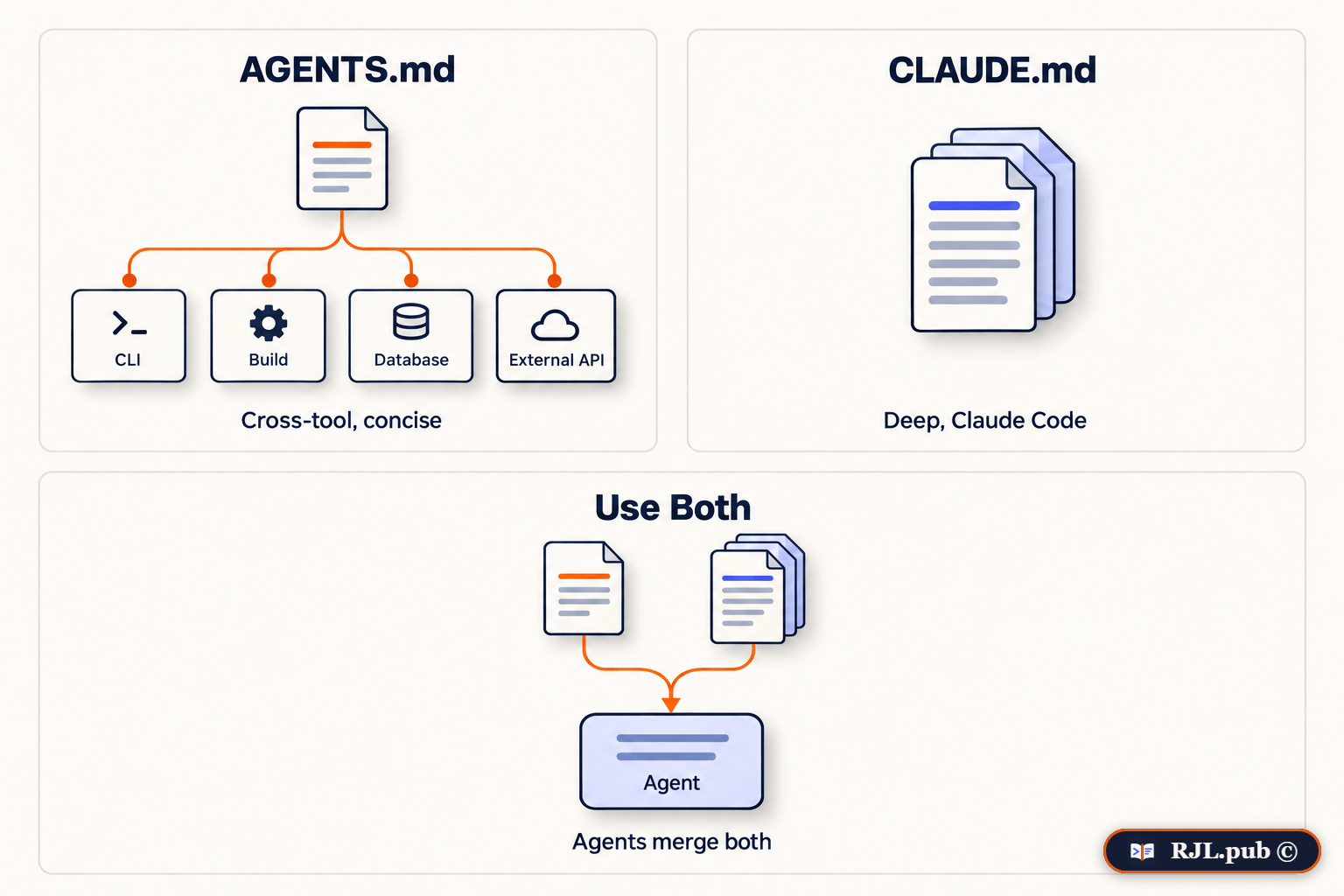
While CLAUDE.md provides comprehensive project context, AGENTS.md has become the cross-vendor standard specifically for AI coding agents. Think of AGENTS.md as a README for agents - a dedicated, predictable place to provide the context and instructions agents need.
Purpose and Design
AGENTS.md complements traditional README files by holding the technical context agents need: build procedures, testing conventions, coding standards - without cluttering human-facing documentation. Format: standard Markdown, no required fields.
Supported Ecosystem
AGENTS.md is read by the major AI coding platforms, including:
- OpenAI Codex
- Google Jules and Antigravity
- GitHub Copilot's coding agent
- Cursor, Aider, Zed, and 20+ others
- Claude Code (via a one-line CLAUDE.md import - it still reads CLAUDE.md natively)
Stewardship of AGENTS.md moved to the Linux Foundation's Agentic AI Foundation (AAIF) in late 2025, alongside MCP - which is what makes it a standard you can build on rather than one vendor's convention. Tens of thousands of public repositories now carry one.
Common Content Areas
# AGENTS.md - AI Coding Agent Instructions

## Project Overview
This is a React + Node.js e-commerce platform.
- Frontend: React 19 + TypeScript + Tailwind
- Backend: Express + PostgreSQL
- Authentication: JWT with refresh tokens

## Quick Setup
```bash
npm install
cp .env.example .env
npm run db:migrate
npm run dev
```

## Build Commands
- Development: `npm run dev`
- Production build: `npm run build`
- Tests: `npm test` (run before committing)
- Linting: `npm run lint` (must pass with 0 errors)

## Testing Requirements
- All new features require unit tests
- API endpoints require integration tests
- Coverage must stay above 80%

## Security Rules
- NEVER commit API keys or secrets
- Always validate user input at API boundaries
- Use parameterized queries only
- Authentication required for all /api/* routes except /api/auth/*
Monorepo-Specific Guidance
For monorepos, nested AGENTS.md files in subdirectories take precedence over the root, allowing specialized context per package:
/AGENTS.md                (Global context)
/packages/api/AGENTS.md   (API-specific rules)
/packages/web/AGENTS.md   (Frontend-specific rules)
AGENTS.md vs CLAUDE.md: When to Use Each
Use AGENTS.md when: you want cross-tool compatibility, concise action-oriented instructions, and a clean separation of AI context from human docs.
Use CLAUDE.md when: you are primarily using Claude Code and need comprehensive project context, detailed architecture, and complex business logic documented.
Use both when: you want maximum compatibility and depth - AGENTS.md for quick-start cross-tool context, CLAUDE.md for architectural depth. Agents read both and merge them. The world is multi-agent now, so having both ensures your project works optimally with any tool.